
And for anybody who might need it…
After all, we’re like a big family here, and it is always a pleasure to help, when I can.
So recently, my very charming friend, Rob from Friends without borders asked me how to access the ”Classic” editing mode, to create new posts. I promised to send him a guide to get rid of the hellish (to a lot of us) Block editor.
Rob, I didn’t forget you (how could I?), but I’m having some issues with Gmail at the moment (I blame Murphy for that), and I just couldn’t find your email back. So I thought I would put the information here. On the plus side, others might benefit from it. *Fingers crossed*
So, first step – click to create a new post, and in the below screen, click on the blue +
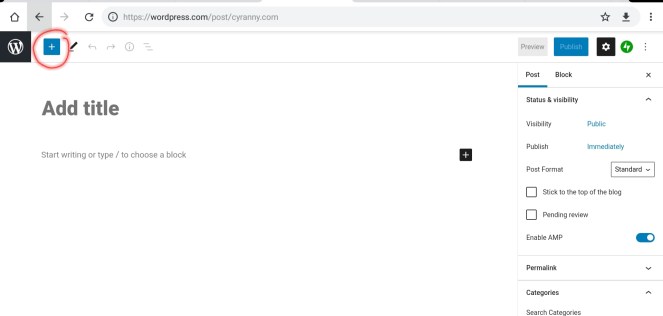
You’ll get the below menu, and just have to click on ”Classic”.

That’s how you’ll get the following option bar, that isn’t exactly what we used in the real ”Classic” editor, but close to it. Just make sure not to click below the black ”x”, because that will create a new block, and you’ll then lose your classic option bar, and have to start over.
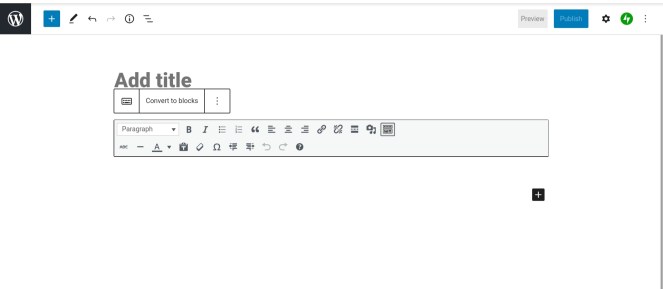
Voilà!
If you have any questions, don’t hesitate to ask.
I hope this will help, even if just a little.
 Cyranny's Cove
Thanks for sharing
LikeLiked by 2 people
My pleasure 🙂 Always glad to help, when I can…
LikeLiked by 1 person
💖😍
LikeLiked by 1 person
Thank you! The block editor was driving me crazy.
LikeLike
Thank you! I just lost my Classic and it’s been driving me nuts!!
LikeLike
I think wp is going to get rid of the classic editor, for real! They keep telling me that every time I create a photo post with my Iphone! If they do I’ll be so disappointed!
LikeLike